

RideMinder
Visit RideMinder
→

LIVE NOW
Enhanced client & new EA portals, and easier quote & booking flow.
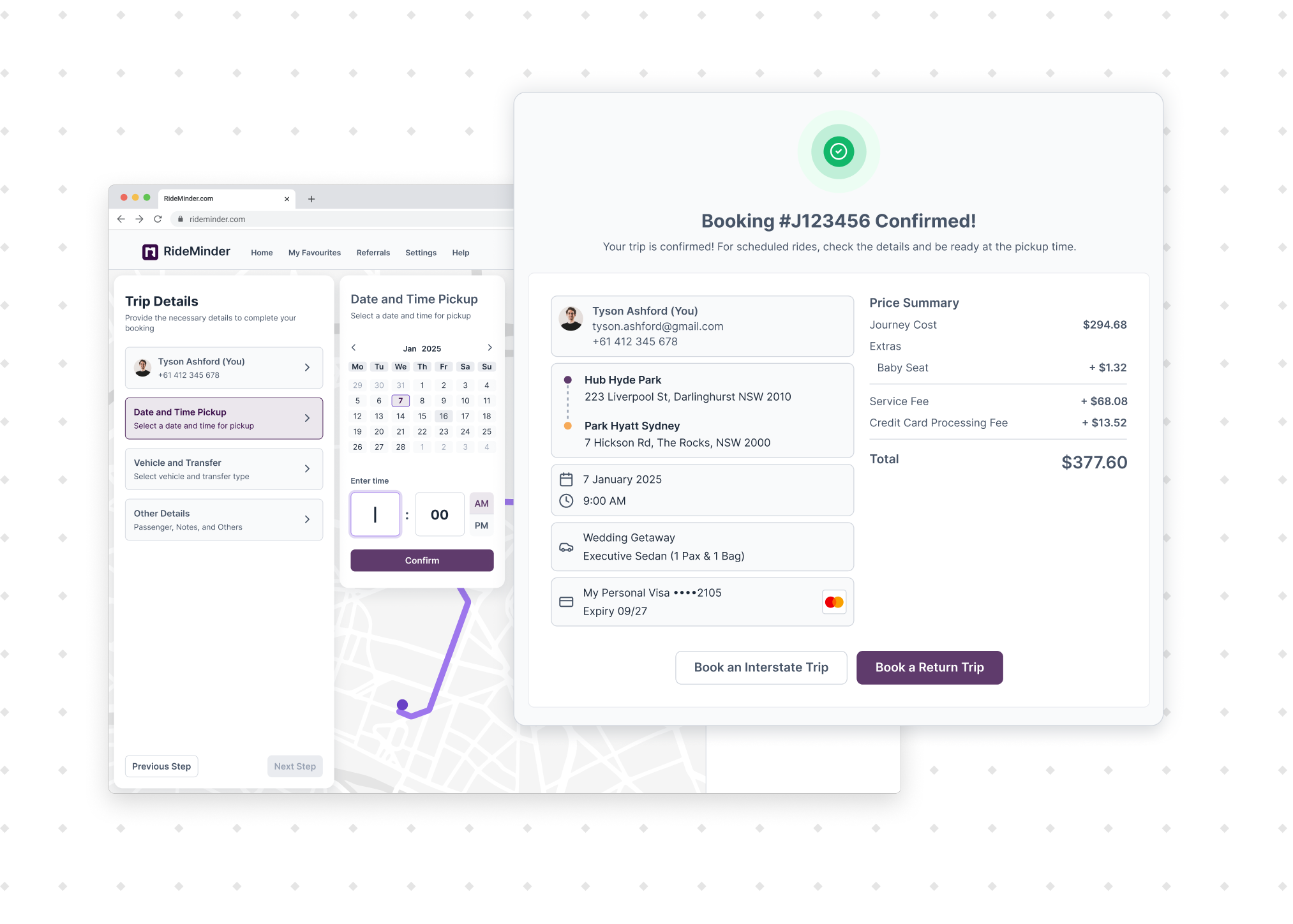
The RideMinder client web screens change for a new and enhanced client and EA/Travel Manager experience. Along with a fresh look and feel, you no longer need to create an account before booking, enter a card up front, add trips one at a time, or watch a flight to move a booking. Everything already saved carries across.


✓
Your information carries across.
Existing client details, bookings, preferences and access remain available.
✓
BOOKING STATUS
All details confirmed
FOR TRANSPORT PROVIDERS & OPERATORS
An easier way to manage clients
Transport Operators & Providers can now manage clients in the new Operator Client Manager. It replaces the tool you use now, and your client details, booking history, and preferences all move across with it.

Operator Client Manager
UPDATED
Replaces the tool you use now. Client details, booking history, and preferences all move across, so there is nothing to re-enter or set up.
Instant Quote tool
UPDATED
OPTIONAL
New look and feel options, with light and dark modes. Your existing Instant Quote embed keeps working untouched unless you choose otherwise. Someone who gets an instant quote on your website can book it there and then, without creating an account or entering a card first. A profile is created for them automatically before checkout.
What you and your customers will notice
You can create a booking without an account, are not asked for a card until checkout, can bulk upload up to 100 jobs at once and flight linked bookings will auto update the pickup time for substantial changes in flight arrival time.
OPERATOR POV · 3 MIN
Run bookings with an enhanced view
The Operator Client Manager, client details and history, booking entry points, and Instant Quote options.
Operator FAQs
What happens to the client tool we use now?

The new Operator Client Manager is now live! With client details, booking history, and preferences all moved across. Nothing needs re-entering. There will be no interruption to your client management and nothing you need to do. Just an easier client management experience with enhanced design.
What happens to bookings during the update?
Nothing stops. Anyone part-way through a booking finishes it in the current screens, and the refresh prompt on submit takes them into the new look and feel screens.
Do we need to update Instant Quote embed?
No. The new booking flow — no account required, card only requested at checkout — applies automatically, whether or not you update the look and feel of your Instant Quote tool. Existing Instant Quote embeds keep working exactly as they do now, and the new light/dark mode options can be adopted whenever it suits you.
What happens to flight-related bookings?
If Flight Tracking is enabled, you will see the flight status. If a flight's arrival time changes substantially, the booking pickup time will be updated automatically, and the usual notification protocols will be followed. No changes will be made to bookings in relation to flight cancellations, diversions, or departure time changes.
Will customer data migrate cleanly?
Yes. Client details, booking history, saved preferences, and access all carry across.
How should we describe this update to clients and EA/Travel Managers?
As an improvement to your own online booking. Your organisation remains the transport provider and your customers' point of contact. RideMinder is the software behind it, mentioned only where that relationship needs explaining. Ready-to-send emails for clients and EAs are in your toolkit, emailed to you on 27 August. There will also be banners inside the web app advising of the change, with a link to this explanatory webpage.
FOR CLIENTS & PASSENGERS
Your client web portal, rebuilt from the ground up.
The old client portal will be replaced by a modern dashboard that will make managing your account easier. Booking itself has also changed, with a faster, more flexible flow from start to finish. Here's what's new:

Book as a guest
NEW
Get an instant quote and go straight through to booking, without creating an account or logging in first.
No card until checkout
NEW
No card details are needed to create an account or start a booking. They are taken when you confirm at checkout.
Bulk booking
NEW
Upload up to 100 transfers in one go.
Flight-linked bookings
NEW
If your flight's landing time changes, the booking is updated and you will see it in the app.
Three steps, with a running summary
UPDATED
Address, trip details, then payment, with the trip visible beside you the whole way.
CLIENT POV · 3 MIN
See the new booking flow from your side
The redesigned dashboard, three-step booking, guest booking, and bulk booking.
Client FAQs
Will I need a new account or login?
No. Existing logins continue to work, and guests can now book without creating an account at all.
When do I need to enter card details?
At checkout, when you confirm the booking. A card is no longer needed to create an account or to start one.
Will my existing information carry across?
Yes. Saved addresses, ride preferences, payment details, and past trips all remain available.
What happens if my flight arrival time changes?
If your flight arrival time changes substantially, your booking will be updated automatically. You'll see the change in your booking history, and a confirmation email will be sent to you. This means your driver will be waiting for you on arrival, so there's nothing for you to organise.
What if my flight is cancelled or diverted?
The booking won't change on its own. Contact your transport provider so they can adjust the arrangements with you.
FOR EAS & TRAVEL MANAGERS
Your Assistant Portal, redesigned with every account you manage in one view.
All bookings across the accounts you manage now sit in a single workspace, and setting up new accounts and access is easier too. Here's what's changed:
All bookings, one view
UPDATED
Every booking across the accounts you manage, on one screen instead of moving between accounts.
Your client list
UPDATED
Open an account, book for that person, and change their settings without moving between logins.
Whose trip it is, on screen
The name of the person you are booking for stays visible while you book.
Bulk booking
NEW
Upload up to 100 transfers in one go.
Flight-linked bookings
NEW
If your flight's landing time changes substantially, the booking is updated and you will see it in the app.
EA POV · 3 MIN
Manage every client from one workspace
All bookings, your client list, booking on someone's behalf, and client settings.
EA FAQs
Does anything change about managing multiple clients?
All bookings across the accounts you manage now sit in one view, with a client list alongside. You can open an account, book for that person, and change their settings without moving between logins.
What happens if a client's flight time changes?
If a client or executive's flight arrival time changes substantially, their booking will be updated automatically. You'll see the change in your booking list, the client/executive will see it in their mobile app, and a confirmation email will be sent. This means a driver will be waiting on arrival, so there's nothing for you to organise. If a flight is cancelled or diverted, you will need to contact your transport provider directly.
Do I need to tell my clients/executives anything about the update?
No. Their logins, saved details, and booking history all continue to work. If they use the webapp directly themselves, they'll receive similar updates and in-app banner notices. If they use the mobile app, nothing will change, and any bookings or changes you make will sync perfectly in real time on their mobile view.
Where do I go if something looks wrong?
Your transport provider is your first point of contact for bookings, changes, and service questions.
What doesn't change.
The mobile app
Nothing in this release replaces it.
All existing data
Client details, booking history, saved preferences, and access carry across for every audience.
Drivers
Nothing in this release touches the driver experience.